Scale - Carpet feet installation
This information does not apply to the Body Scan and Body Cardio.
If you have a Body, Body Pro, or Body+, and you are using the scale on a carpet, we recommend that you use the carpet feet included with your scale.
To install the carpet feet, please follow these steps:
- Remove the tab on the underside of each carpet foot.

- Insert each carpet foot into their corresponding point on the bottom of the scale.
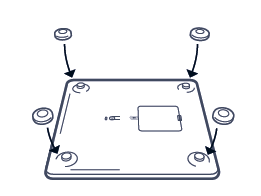
If you have a Body Pro 2, Body Comp, or Body Smart, and you are using the scale on a carpet, we recommend that you use the carpet feet included with your scale.
To install the carpet feet, please follow these steps:
- Remove the carpet feet from the box. The feet contain clips that will be able to lock into place with the four foot points on the bottom of the scale.
- Insert each carpet foot into their corresponding point on the bottom of the scale.